
2026 Quick Guide: Video Translation into Multiple Languages
- Why Translate Videos into Multiple Languages?
- 3 Main Methods for Video Translation
- Step-by-Step Process for Each Method
- What Are the Best Video Translation Tools in 2026?
- Common Challenges and Solutions
- Tips for Effective Video Translation
- FAQs About Translating Video into Multiple Languages
Why Translate Videos into Multiple Languages?
1. Reach Global Audiences – The internet has no borders, but language barriers still exist. By translating your videos, you can connect with viewers in their native languages. This expands your potential audience from millions to billions.
People are more likely to watch videos in their native language, making translation a key factor for engagement and retention.
2. Increase Engagement and Accessibility – Translated videos aren’t just about reaching new audiences—they’re about serving your existing audience better. Accessibility features like subtitles help viewers with hearing impairments, while dubbed versions make content more immersive.
Educational content, tutorials, and explainer videos become significantly more effective when viewers can understand them without language barriers.
3. Boost SEO and Discoverability – Search engines index video transcripts and subtitles. When you translate these elements, your videos appear in search results across multiple languages. This dramatically increases your content’s visibility and organic reach.
Multilingual videos also tend to have higher watch time and engagement metrics, which further boost their search rankings.
3 Main Methods for Video Translation
Method 1: Subtitles Only Translation
Subtitles are text overlays that appear at the bottom of your video. They’re the most common and cost-effective way to translate video content.
Best for:
- Educational content and tutorials
- Documentary-style videos
- Content where the original audio is important
- Quick translations with limited budgets
Limitations:
- Requires viewers to read while watching
- May distract from visual content
- Less immersive than other methods
Method 2: Dubbing (Voice Replacement)
AI dubbing replaces the original audio with translated voiceovers. Professional dubbing maintains the emotional tone and timing of the original content.
Best for:
- Narrative content and stories
- Marketing and promotional videos
- Children’s content
- High-production value projects
Limitations:
- More expensive and time-consuming
- Requires voice talent and audio engineering
- Lip-sync challenges with live-action footage
Method 3: Hybrid Approach (Subtitles + Dubbing)
This method combines both approaches, offering viewers a choice. You might provide dubbed audio with optional subtitles, or use subtitles for some languages and dubbing for others.
Best for:
- Global platforms with diverse audiences
- Content where accessibility is a priority
- Projects with varying budget allocations per language
- Educational platforms with multiple learning preferences
Step-by-Step Process for Each Method
1. How to Add Multilingual Subtitles to Your Videos
Step 1: Transcribe Your Original Video
Start by creating an accurate transcript of your video. You can do this manually or use automated speech recognition tools. Ensure the timing is precise for each segment.
Step 2: Translate the Transcript
Use professional translation services or reliable translation software. Consider cultural nuances and context—direct word-for-word translations often miss important meanings.
Step 3: Time the Subtitles
Sync your translated text with the video timeline. Each subtitle should appear long enough to be read comfortably (typically 1-2 seconds per line).
Step 4: Format and Style
Choose readable fonts, appropriate colors, and proper positioning. Ensure subtitles don’t cover important visual elements.
Step 5: Export and Test
Export your video with embedded subtitles or as a separate subtitle file (SRT, VTT). Test on different devices and with native speakers.
2. How to Dub Videos into Multiple Languages
Step 1: Prepare Translation Script
Create a translated script that matches the original’s timing and emotional tone. Account for differences in sentence length between languages.
Step 2: Cast Voice Talent
Select voice actors who match the original speakers’ characteristics. Consider age, gender, and vocal quality.
Step 3: Record Voiceovers
Use professional recording equipment in a sound-treated environment. Maintain consistent audio quality across all recordings.
Step 4: Edit and Mix
Align the new audio with the video, adjusting timing as needed. Mix background sounds and music to create a natural final product.
Step 5: Quality Assurance
Have native speakers review the dubbed content for accuracy and natural flow. Make adjustments based on feedback.
3. AI-Powered Translation Workflow
Modern tools like RecCloud offer streamlined workflows for video translation. These platforms typically follow this process:
- Upload your video to the platform
- Choose your preferred target language to translate the video
- Select the voice clone feature, then initiate the translation
- Once done, preview and edit the translated content, like making the subtitle bilingual, to apply video translation into multiple languages
- Export in your preferred format
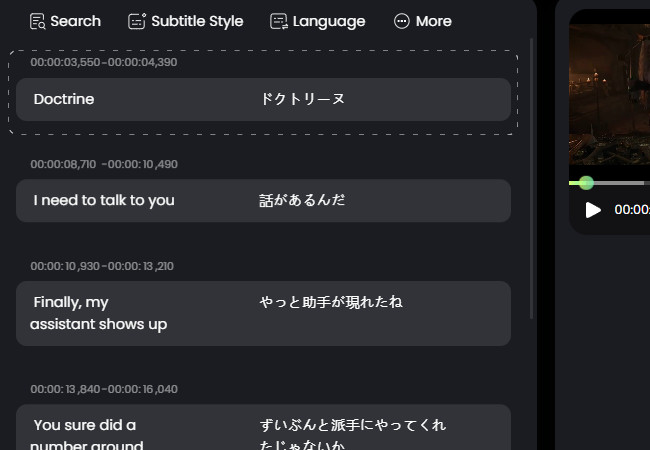
This approach significantly reduces time and cost while maintaining quality for many use cases.
What Are the Best Video Translation Tools in 2026?
1. AI Translation Platforms
AI-powered platforms have revolutionized video translation. They offer:
- Automated transcription and translation
- AI voice generation for dubbing
- Real-time preview and editing
- Support for multiple languages simultaneously
Platforms like RecCloud provide comprehensive solutions that handle everything from transcription to final delivery, making them ideal for content creators who need to do video translation into multiple languages regularly.
2. Traditional Video Editing Software
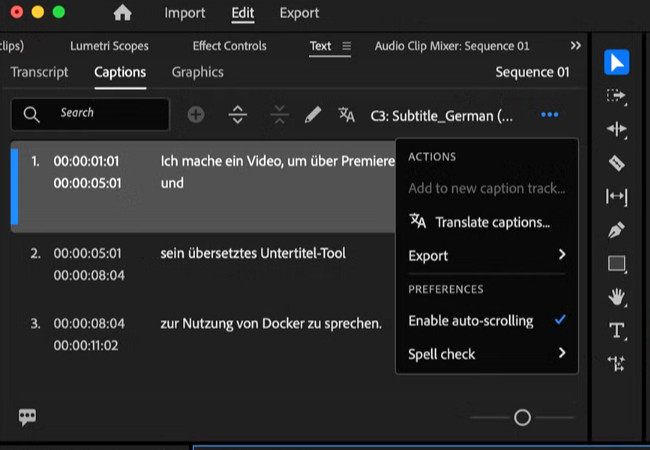
Professional editing suites like Adobe Premiere Pro and DaVinci Resolve offer subtitle/caption and audio translation features. These are best for:
- High-end production studios
- Projects requiring precise control
- Complex editing workflows
- Integration with other production tools
3. Professional Translation Services
For mission-critical content, professional services provide:
- Human translators with subject matter expertise
- Cultural adaptation and localization
- Quality assurance processes
- Legal and compliance verification
These services are essential for legal, medical, or highly technical content where accuracy is paramount.
Common Challenges and Solutions
1. Maintaining Lip Sync in Dubbed Videos
Challenge: Different languages have different sentence structures and speaking rhythms, making lip sync difficult.
Solution:
- Use adaptation techniques that match mouth movements
- Consider using voice-over narration instead of direct dubbing for difficult scenes
- Use AI tools that can adjust speech timing automatically
- Cultural Adaptation and Localization
2. Cultural Adaptation and Localization
Challenge: Direct translations often miss cultural references, humor, and context.
Solution:
- Work with native speakers who understand both cultures
- Adapt examples, metaphors, and references to be culturally relevant
- Consider regional variations within the same language
3. File Format and Size Considerations
Challenge: Different platforms have different requirements for video formats and subtitle files.
Solution:
- Research platform specifications before starting
- Use universal formats like MP4 for video and SRT for subtitles
- Consider creating multiple versions optimized for different platforms
Tips for Effective Video Translation
1. Prepare Your Source Content Properly
Start with high-quality source material. Clear audio, good lighting, and simple backgrounds make translation easier and more effective. Avoid slang and culturally specific references if you plan to translate the content.
2. Choose the Right Languages for Your Audience
Don’t translate into every language—focus on the languages your target audience actually speaks. Analyze your audience demographics and prioritize languages with the highest potential return.
3. Test and Iterate Based on Feedback
Release translated content in phases. Start with one or two languages, gather feedback, and refine your approach before expanding to more languages. Monitor engagement metrics to see which languages perform best.
FAQs About Translating Video into Multiple Languages
1. How much does it cost to translate a video into multiple languages?
Costs vary widely based on method, languages, and quality. AI tools can be as low as $10-50 per language, while professional human translation with dubbing can range from $500-5000 per language for a 10-minute video.
2. How long does video translation take?
AI translation can be done in minutes to hours. Professional human translation with dubbing typically takes 3-7 days per language, depending on complexity and length.
3. Can I translate videos automatically for free?
Some platforms offer limited free translation, but quality varies. Free tools often have restrictions on video length, number of languages, or output quality. For professional results, consider paid solutions.
4. How many languages should I translate my videos into?
Start with 2-3 languages that match your primary audience. Expand based on engagement data and audience requests. Quality in a few languages is better than poor quality in many languages.
5. How do I handle videos with multiple speakers?
Use speaker identification features available in many translation tools. This ensures each speaker’s dialogue is translated consistently and assigned to the correct voice in dubbed versions.
Conclusion
Translating videos into multiple languages is an essential skill in today’s global digital landscape. Whether you choose subtitles, dubbing, or a hybrid approach, the key is to match the method to your content and audience.
Start with a clear strategy, choose the right tools for your needs, and focus on quality over quantity. Remember that effective translation isn’t just about changing words—it’s about conveying meaning, emotion, and context across cultural boundaries.
With the right approach, your videos can reach and resonate with audiences around the world, turning language barriers into bridges for connection and understanding.


Leave a Comment