3 Best YouTube to MP3 Translator Tools You Must Explore
- What Is a YouTube to MP3 Translator?
- How to Download YouTube Videos as MP3 and Translate the Audio
- Top 3 YouTube to MP3 Translator Tools [Free & Direct Alternatives]
- FAQs About YouTube to MP3 Translators
What Is a YouTube to MP3 Translator?
A YouTube to MP3 translator is a tool that lets you convert the audio from a YouTube video into an MP3 file while also translating the spoken content into another language. Instead of just downloading the original audio, it transcribes what’s being said and creates a translated version you can listen to.
This kind of tool is useful if you want to enjoy YouTube videos in a different language, study lessons offline, practice pronunciation, or save translated audio without watching the video. It’s a simple way to turn videos into audio you can understand anywhere.
How to Download YouTube Videos as MP3 and Translate the Audio
If you don’t have a dedicated YouTube to MP3 translator or are having trouble finding one, there’s an indirect way to achieve the same result: first convert the video to MP3, then translate the audio separately. It’s a simple method that works with most YouTube content, though, unlike a dedicated tool, it requires a few extra steps to complete.
Here’s how you will do it:
- Head to the YouTube video you wish to convert into an MP3 and copy its URL.
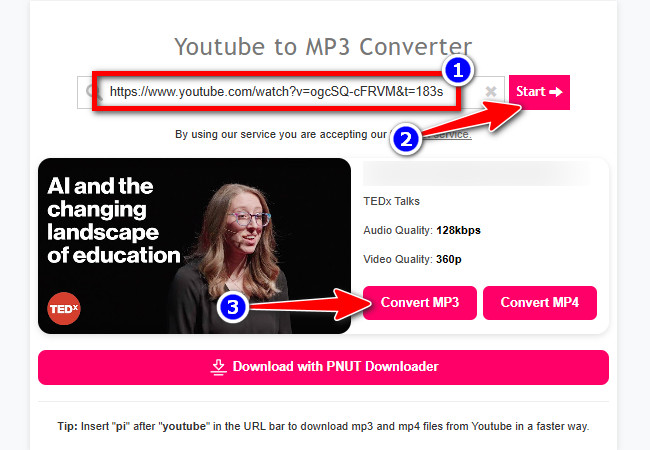
- Next, visit a YouTube to MP3 downloader like Y2Mate and paste the copied link into it. Then, click “Start”, and once the video is processed, click “Convert to MP3”, and then “Download MP3” to save it as an MP3 file.
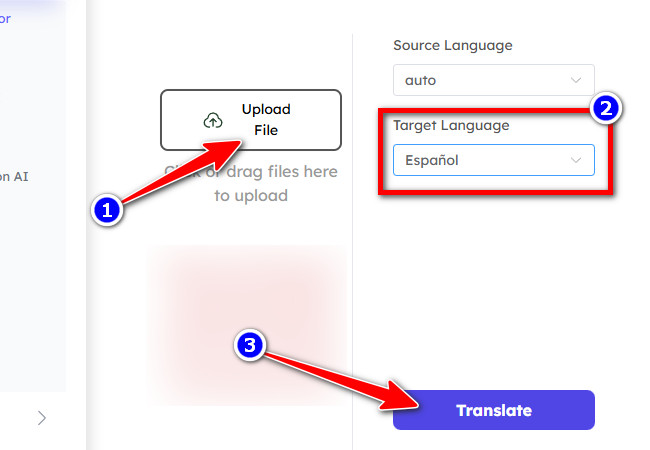
- Once you have the file, visit an online MP3 translator tool like AudioCleaner and import it by clicking “Upload File”. Then, select the target language you want to translate the file into and click the “Translate” button.
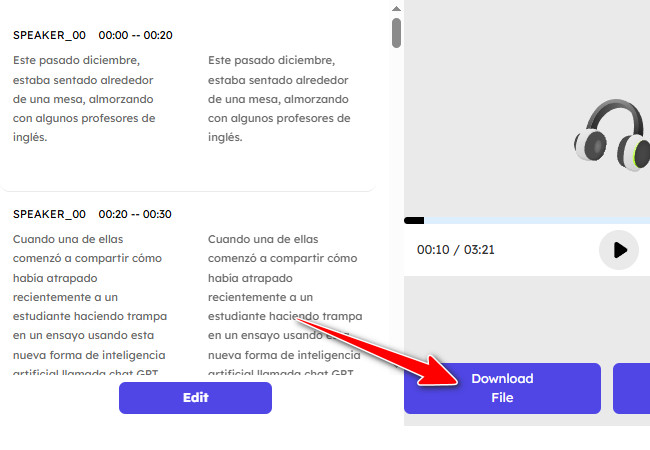
- Once the tool has processed the MP3 file, click the “Download File” button to download the translated MP3 file. And that’s it! That’s how you download YouTube videos as MP3 and translate the audio without using a YouTube to MP3 translator.
Top 3 YouTube to MP3 Translator Tools [Free & Direct Alternatives]
If you found the indirect method earlier too much of a hassle, you should try these top three YouTube to MP3 translator tools. These tools can both convert YouTube videos to MP3 and translate them into your preferred language. So, without any further ado, start exploring them now.
1. RecCloud
The first tool you can use as a YouTube to MP3 translator is RecCloud. This web-based tool offers a Free Online AI Video Translator that, as the name suggests, supports language translation and MP3 conversion through export. It can translate video content into multiple languages (70 major languages, including various dialects and accents) using AI, providing both subtitles and voiceover translations. Additionally, it stands out for its advanced AI algorithms, which deliver translations with remarkable precision. Since you may prefer to listen to or use an MP3 version of a translated YouTube video, this tool offers a variety of voice tones to replace the original voice. Moreover, it exports high-quality MP3 files, allowing you to enjoy the best audio experience offline.
Here’s how you can use it:
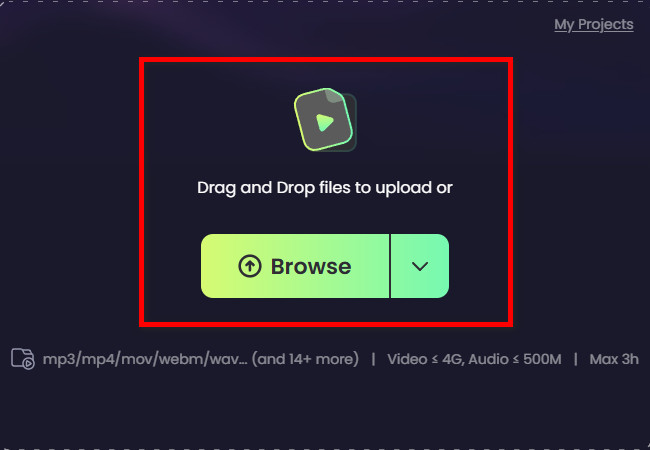
- Download the YouTube video you want to convert to MP3 and translate. Then, go to RecCloud’s Free Online AI Video Translator website and import the downloaded video by either dragging and dropping it or clicking the “Browse” button.
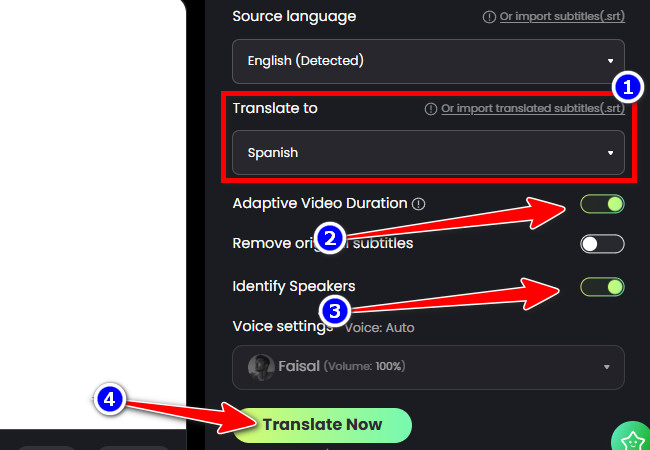
- After that, choose your preferred language by clicking the “Translate to” dropdown menu. Then, toggle on the “Adaptive Video Duration” and “Identify Speakers” for a much better translation. After that, click “Translate Now”.
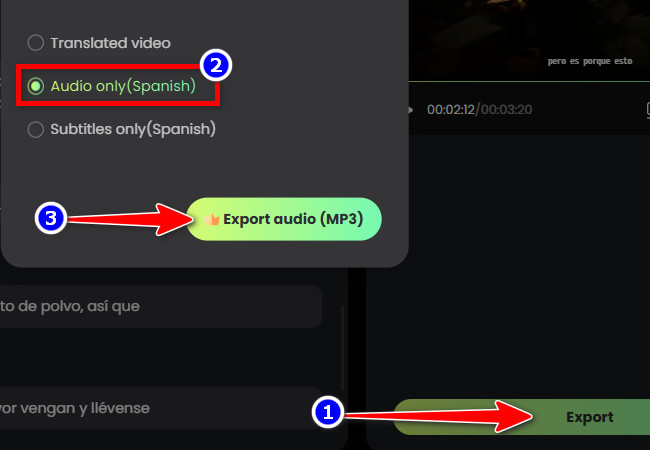
- Once the translation is finished and you are satisfied with it, click the “Export” button, select the “Audio only (Spanish)” option, and then click “Export audio (MP3)” to save it. And that’s it! That’s how you use this tool as a YouTube to MP3 translator!
2. Kapwing
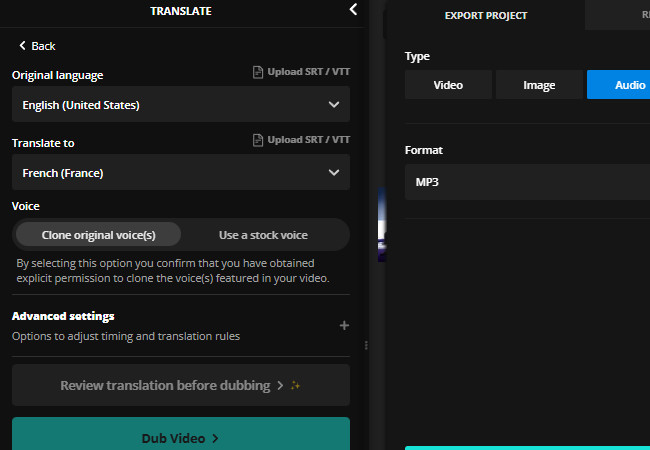
Another tool you can use as a YouTube to MP3 translator is Kapwing. Like the first featured tool, it also supports a video translator that allows you to perform both processes: translation and MP3 export. Additionally, it provides the necessary options to achieve your desired translation output, such as choosing a target language, selecting whether to clone the speakers’ original voices or use a stock voice, and more. What makes this tool different is that it is packed with various video and audio-based editing features and lets you translate and convert YouTube videos simply by importing their links. Sadly, all of these capabilities, especially link importation, are available for free.
Key Features:
- Translate videos into 100+ languages, which include French, Spanish, and more.
- Supports 180+ realistic AI voices or clone the original voice for translated output.
- Flexible pronunciation and translation rules, including custom spellings and brand terms.
3. Rask
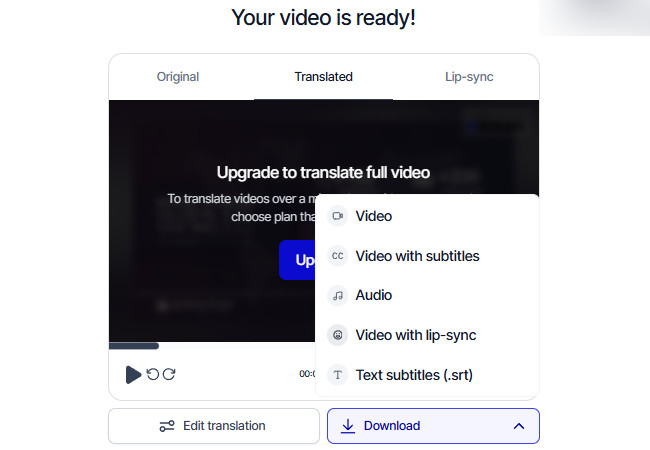
Another YouTube to MP3 translator tool you can use is Rask. Similar to the tools earlier, this one also supports both YouTube video translation and MP3 exportation. Apart from that, it provides the necessary options to achieve your desired translation output, such as choosing a target language, adding a project name, and automatically detecting the number of speakers. What makes this tool stand out is that, compared to Kapwing, it offers a much better interface that is simple and easy to navigate. However, most of this tool’s features are not available for free.
Key Features:
- Allows you to edit the translation to enhance accuracy.
- Supports options to adjust voice clones’ expressiveness and similarity, and accent.
- Automatically detects the number of speakers and allows you to apply corresponding voice clones.
FAQs About YouTube to MP3 Translators
1. Do these tools preserve the original audio quality when translating to MP3?
Generally, yes. Tools like RecCloud, Kapwing, and Rask export high-quality MP3 files, though the final quality may vary depending on the original video.
2. Can I translate a YouTube video into multiple languages at once?
Yes, but with limitations. RecCloud supports bilingual translation, allowing two languages at the same time, while Rask lets you add multiple translations one by one in the preview, displaying them together for multi-language output.
3. Can I use a YouTube to MP3 translator on mobile devices?
Yes, most modern YouTube to MP3 translators are web-based and work on smartphones and tablets, allowing you to download, translate, and export MP3 files directly from your mobile browser without installing extra software.
Conclusion
In conclusion, a YouTube to MP3 translator is a useful tool for anyone who wants to listen to videos offline or in another language. Tools like RecCloud make bilingual translations simple, Rask lets you add multiple languages one by one, and Kapwing offers flexible voice options for translated audio. Choosing the right tool lets you enjoy videos in your preferred language, study more effectively, or create audio versions of your favorite content without having to watch the full video.




Leave a Comment