
3 Effective Video Translation Workflows that Actually Work
- Why AI-Translated Videos Often Sound Unnatural
- 3 Workflows People Actually Use
- Making Translation Feel Natural
- Practical Step-by-Step Workflow
- FAQ: Video Translation Questions Answered
Why AI-Translated Videos Often Sound Unnatural
1. The timing mismatch problem
AI tools translate words, but they don’t understand timing. Human speech has natural rhythms—pauses for emphasis, changes in pace for dramatic effect. When AI translates word-for-word without adjusting timing, the result feels rushed or awkward.
2. Missing emotional cues and pauses
Consider how a speaker pauses before an important point. Or how they speed up when excited. These subtle cues get lost in direct translation. The translated audio often plows through emotional moments without appropriate breathing space.
3. Cultural and sentence structure issues
Languages structure sentences differently. English tends to be subject-verb-object, while other languages might place the verb at the end. Direct translation creates confusing sentence structures that sound foreign even when the words are technically correct.
3 Workflows People Actually Use
1. Subtitle-First Workflow (Most Common)
When to use it: Educational content, interviews, documentaries, and tutorials where preserving the original speaker’s voice matters.
How it works:
- Transcribe the original audio accurately
- Translate the transcript while maintaining meaning
- Create timed subtitles that match speech patterns
- Add the subtitles to the video
Pros: Accurate translation, preserves original voice emotion, cost-effective, accessible to hearing-impaired viewers.
Cons: Requires viewers to read, not ideal for visual-heavy content where attention is divided.
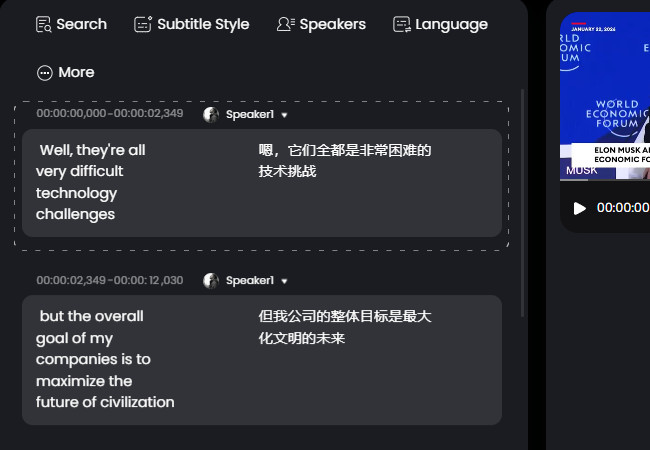
Content creators on YouTube and educational platforms use this approach extensively. Platforms like RecCloud offer transcription and translation tools that streamline this workflow while maintaining quality control.
2. AI Dubbing Workflow (Fast but Limited)
When it works: Simple tutorials, social media clips, internal training videos, and content where speed matters more than perfection.
How it works:
- Feed the video to an AI translation tool such as HeyGen or similar platforms
- Let it generate translated audio automatically
- Replace the original audio track
- Make minimal adjustments
Pros: Extremely fast, creates a completely new audio track, good for rapid content repurposing.
Cons: Often sounds robotic, timing issues are common, emotional disconnect, and limited voice options.
This approach works for content where the message is more important than delivery quality. Many marketers use this for translating short social media clips across different language markets.
3. Hybrid Workflow (Professional Results)
When to use it: Marketing videos, high-stakes content, paid courses, brand videos where quality cannot be compromised.
How it works:
- Human translation of the transcript (focus on meaning, not word-for-word)
- Professional timing adjustments for natural speech patterns
- AI voice generation with careful parameter tuning
- Manual synchronization and quality checks
Pros: Natural-sounding, professional quality, culturally appropriate, maintains brand voice.
Cons: More time investment, higher cost, requires multiple tools and skills.
This is what professional localization teams use. They might start with tools like RecCloud’s Free Online AI Video Translator for initial transcription and translation, then bring in human editors for refinement, and finally use specialized voice tools for the final audio.
Making Translation Feel Natural
1. Timing and synchronization adjustments
Natural translation adds pauses where the original speaker breathed. It speeds up during less important sections and slows down for emphasis. This isn’t about matching words—it’s about matching speech patterns.
2. Preserving emotional pacing and pauses
Listen to where the original speaker gets excited, where they’re thoughtful, where they’re urgent. These emotional cues must translate across languages. Sometimes this means changing word choice to match emotional tone rather than literal meaning.
3. Cultural adaptation and sentence restructuring
Good translation changes sentence structure to feel natural in the target language. It might rearrange clauses, change metaphors to culturally relevant ones, or adjust humor to land properly.
4. Voice quality and tone matching
The voice should match the content’s tone. A serious documentary needs a different voice than an energetic product demo. Professional workflows often involve auditioning multiple AI voices or even using voice cloning for consistency.
Practical Step-by-Step Workflow
1. Preparation: Organize files and set objectives
Start by defining your goals. Is this for maximum reach? For paid content quality? For internal training? Your objective determines which workflow to use. Gather all source files and note any specific terminology or brand guidelines.
2. Transcription: Get accurate source text
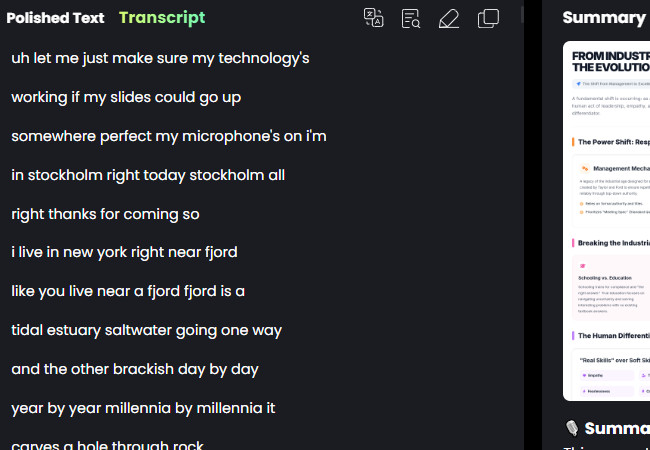
Use a reliable transcription service. Accuracy here is crucial—garbage in, garbage out. Tools that offer speaker identification and timestamp accuracy save hours later. RecCloud’s AI Speech to Text tools provide editable transcripts with precise timing.
3. Translation: Focus on meaning, not word-for-word
Translate for meaning, not literal accuracy. Consider cultural context and target audience expectations. Professional translators often create two versions: one literal for reference, one adapted for natural delivery.
4. Timing: Adjust for natural speech patterns
This is where most workflows fail. Calculate speaking rates, add appropriate pauses, and adjust sentence breaks. The translated text should fit the original video timing while feeling natural in the new language.
5. Voice/Subtitle Application: Choose based on content type
For visual content, subtitles often work better. Demo videos, consider dubbing. For mixed content, you might need both. Tools that offer preview functionality let you test different approaches before committing.
6. Quality Check: Watch with fresh eyes/ears
Always review the final product as if you’re seeing it for the first time. Better yet, have a native speaker of the target language review it. Check for synchronization issues, unnatural phrasing, and cultural appropriateness.
FAQ: Video Translation Questions Answered
1. What’s the fastest way to translate a video?
For speed, use an AI dubbing workflow with a tool that handles the entire process automatically. But understand you’re trading quality for speed. For better results in less time, use the subtitle-first approach with automated transcription and translation tools.
2. Can AI fully replace human translators for video?
For simple, straightforward content—yes. For anything requiring nuance, cultural adaptation, or emotional resonance—not yet. The hybrid approach (AI-assisted human translation) currently delivers the best balance of speed and quality.
3. How much does professional video translation cost?
Costs vary dramatically. Simple AI translation can be free or low-cost. Professional human translation with voice actors can cost hundreds per minute. Most content creators find the sweet spot with AI-assisted workflows that include human quality checks.
4. What file formats work best?
MP4 for video, SRT for subtitles, and MP3 for audio provide the most compatibility. Always keep original high-quality files, as each conversion can degrade quality. Cloud-based tools like RecCloud typically support all common formats without requiring local conversions.
5. How do I maintain audio quality during translation?
Start with the highest quality source audio possible. Use lossless formats when available. During AI voice generation, select higher quality settings even if they take longer. Always compare the final audio to the original to ensure no significant quality loss.
Conclusion
Key takeaway: Successful video translation isn’t about finding one perfect tool. It’s about building a workflow that matches your content type, quality requirements, and resources. Start with clear objectives, choose the appropriate workflow, and don’t be afraid to mix automated tools with human oversight for the best results.




Leave a Comment