
3 Workable Ways to Convert YouTube Video to OGG [with Steps]
- What Is the OGG Format and Its Benefits
- How to Convert YouTube to OGG Using YTMP3
- Simple Steps to Convert a YouTube Video into OGG through Evano
- How to Use TubeRipper as a YouTube to OGG Converter
- Recommended Tip: Turn YouTube Videos into Text for Better OGG Playback
- FAQs about YouTube to OGG
What Is the OGG Format and Its Benefits
Before exploring the three best ways to convert YouTube videos into OGG, you might want to know a brief background about the OGG format first. Although you might already know what the OGG format is, there may be things you don’t know about it. In addition to a brief description, this post also lists some benefits you can get from using the OGG format.
So, what is the OGG format? Well, OGG is a free, open-source audio format that provides good sound quality without taking up too much space. It’s more efficient than MP3, which means you can get clearer audio with smaller file sizes. OGG works on most media players and is popular with Linux users and open-source software fans because it’s free to use and doesn’t have any licensing restrictions.
Benefits of Using OGG:
- Clear sound, smaller files – Great audio without consuming too much storage.
- Free and open – No fees or restrictions.
- Wide compatibility – Plays on most players, Linux systems, and even some games.
- Efficient for long audio – Ideal for podcasts, lectures, or long music tracks.
- Flexible usage – Fits well in projects, apps, or any audio workflow you need.
How to Convert YouTube to OGG Using YTMP3
The first ad-free web-based tool you can use to convert YouTube to OGG is YTMP3. This tool perfectly suits users who want an easy-to-use, free solution with reliable output. By simply providing the YouTube video’s link, the tool will automatically convert it into an OGG file. What sets this one apart from the rest is that it offers fast conversion while delivering high audio quality with a balanced file size.
Here’s How to Use It:
- Go to the YouTube video you want to convert to OGG and copy its URL. Then, visit the YTMP3.gg website and paste the URL into the input field.
- Next, you don’t need to set OGG as the export format, as it is already selected. All you need to do now is click “Convert” to start the conversion process and wait for it to finish.
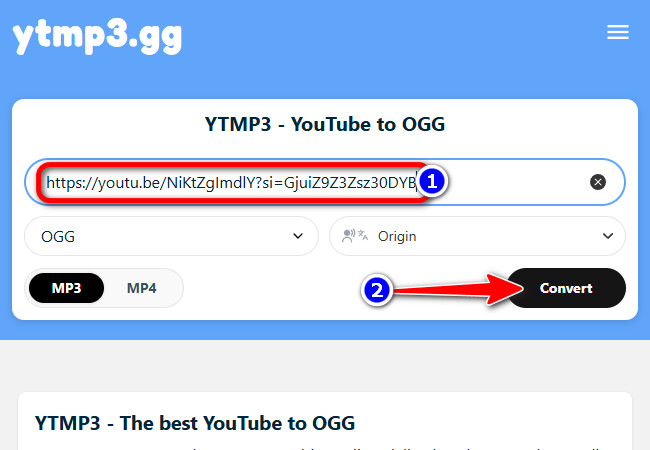
- Once the conversion is complete, click the “Download” button to save the converted version of the YouTube video as an OGG file.

Simple Steps to Convert a YouTube Video into OGG through Evano
The next YouTube to OGG converter that you should also try is the ad-free Evano. This one also follows the same process as the first: you provide the YouTube link, let the tool convert it into an OGG audio file, and that’s it! Pretty easy, right? What makes this web-based tool a great solution is that aside from its conversion speed, it also delivers high-quality output you can rely on. However, it doesn’t always work, but it is still an option worth trying. Want to know how to use this one? Explore the steps below.
Here’s How to Use It:
- Copy the link of the YouTube video that you want to save as an OGG file. Then, visit Evano‘s website, paste the copied link into its URL input box.
- After that, click “Start Download” and the tool will then start the conversion process automatically.
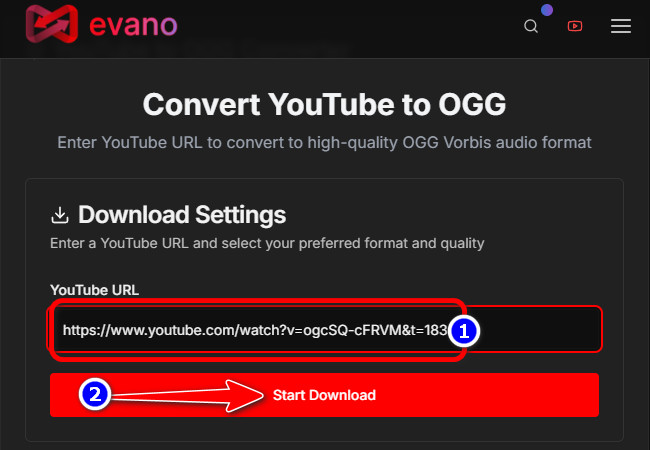
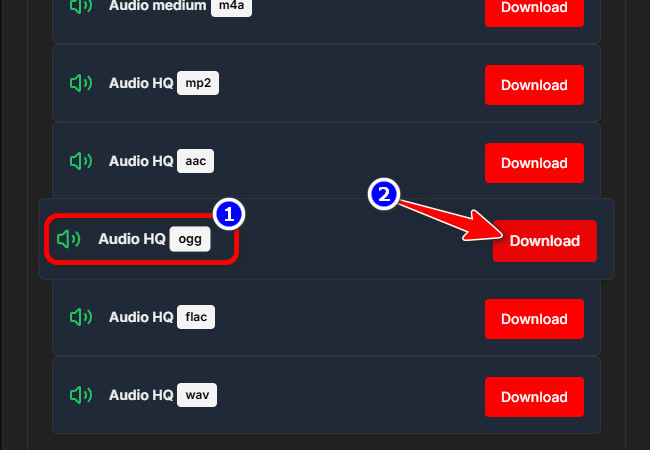
- Once it’s done, it will automatically display different output formats. Scroll down and look for “Audio HQ OGG” and click its “Download” button.
How to Use TubeRipper as a YouTube to OGG Converter
The last web-based solution you can use to convert a YouTube video to OGG is TubeRipper. This tool operates similarly to the first two featured tools earlier. What makes this one different from the others is that it lets you see a preview of the output before you export it. Most of the output you might get when converting a YouTube video to OGG is 48 kHz, which is considered high quality. The downside of using this solution is that it automatically opens a new browser tab with an ad, which might bother you.
Here’s How to Use It:
- Copy the YouTube video link that you want to convert. Then, visit TubeRipper‘s website and paste the copied link into its input field. After that, click the “Arrow” icon at the end of the field.
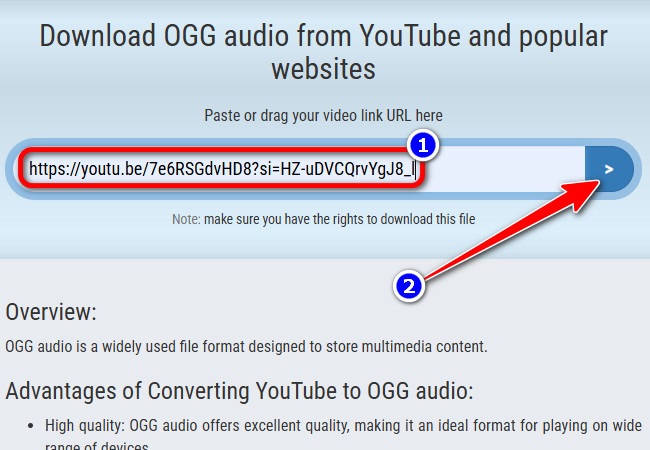
- Once the conversion is finished, click the “mp3” dropdown button and select “ogg” from the list of options. After selecting the OGG format, the tool will automatically start downloading the YouTube video as an OGG file.

Recommended Tip: Turn YouTube Videos into Text for Better OGG Playback
There you go! Those are the three best tools you can use to convert YouTube to OGG. Now, if you are doing this to learn from a specific YouTube video while listening to it as an OGG file for studying or research, this post recommends RecCloud’s Free YouTube Transcript Generator for a much easier listening experience. This web-based tool can turn any YouTube video into a transcript or a text-based file. It uses AI trained on thousands of long videos, allowing it to deliver over 98% accurate output. With that, you can obtain a highly accurate text version of a YouTube video with precise timestamps. Additionally, you can enjoy reading the text-based version of a YouTube video in your preferred language, as this tool not only supports videos in different languages but also allows you to translate them while keeping the original message.
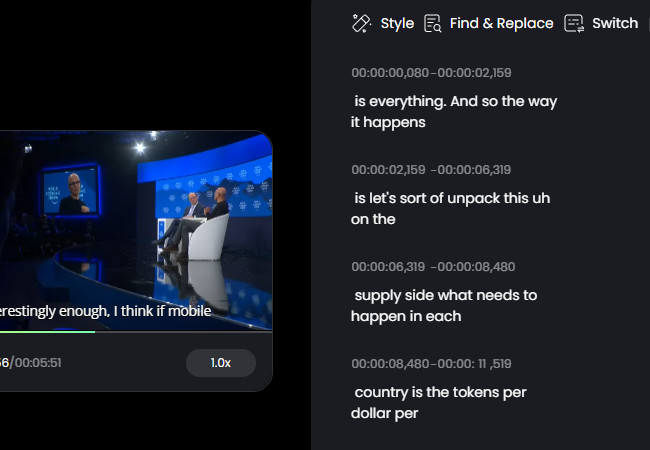
Key Features
- Create accurate transcripts from YouTube videos by simply pasting a link.
- Fine-tune the text and timestamps to match the OGG audio more precisely.
- Convert transcripts into various languages, including Spanish, French, German, etc.
- Download subtitle files in SRT format or export the video with subtitles already added.
- Work with fully editable transcripts that make reviewing and updating content easy.
FAQs about YouTube to OGG
1. Can I convert any YouTube video to OGG for free?
Yes. With tools like YTMP3, Evano, and TubeRipper, you can turn YouTube videos into OGG audio for free. All you need to do is paste the video link, pick OGG if required, and download it.
2. Is the OGG audio quality better than MP3?
Yes. OGG files provide clearer sound without taking up much space. Most converters produce 48 kHz audio, which is considered high quality. This makes OGG great for music, lectures, podcasts, or any long audio content.
3. Will these OGG files play on my devices?
Most media players, Linux systems, and even some games can play OGG. If your device doesn’t support it, you can use a compatible player or convert the file to MP3. OGG is flexible, but it’s always good to check your device first.
Conclusion
Converting YouTube to OGG is a simple way to enjoy your favorite videos as high-quality audio without taking up too much space. Tools like YTMP3, Evano, and TubeRipper make it quick, easy, and completely free, even if you have never done it before. OGG files sound clear, stay small in size, and work on most devices, making them perfect for music, podcasts, lectures, or long audio content. For an even smoother experience, you can pair your OGG files with a transcript tool like RecCloud to read along, translate, or follow exact timestamps. Give it a try and enjoy YouTube content anytime and anywhere.



Leave a Comment